

Bookmark Video Pro
by RagtimeSoft
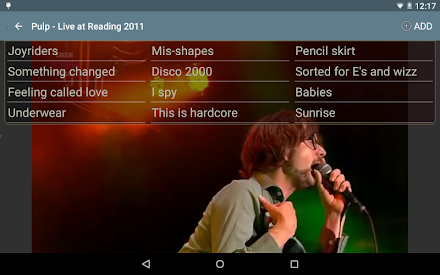
Bookmark Video helps organize a video into bookmarks so you can jump to easily.

Bookmark Video Pro
With this app, you can quickly open your favorite songs in a concert, jump to the most memorable moments of your wedding video, or follow the examples in a video lesson to learn from your guitar hero.
All with just one touch.You can also organize related bookmarks into group so you can show only interested bookmarks when you need them.- Usability enhancements- Support Russian language
About Bookmark Video Pro
- Package name (App ID)
- com.ragtimesoft.ragtimevideobookmarker
- Available on
- Google Play
- Price
- $2.49
- Developer
- RagtimeSoft
Looking for the Bookmark Video Pro APK?
The safest way to get Bookmark Video Pro (com.ragtimesoft.ragtimevideobookmarker) on your Android device is to install it directly from Google Play — you'll always get the latest official version, automatic updates, and no risk of modified or infected APK files from third-party sites.

Camera Features
Advanced camera features with editing capabilities.
Learning Tools
Enhance your learning experience with interactive features.
24/7 Support
Our dedicated support team is always ready to help you.
See Bookmark Video Pro in Action


What Our Users Say
Don't just take our word for it. Here's what our users have to say about this Android app.
"Very good app. Would be perfect if it had loop (clip) option, like YouTube player."
"Don't have to manual input the name each time. Just offer an opinion for saving the bookmark with default name, like 1,2,3..., so that one operation could save the bookmark"
"Excellent app. Watching movie scenes is easy now. Even a begginer can use it. I highly recommend it. Definitely deserves 5 stars."
"Easy but has most important thing. Many times I have to spend a lot of time on searching funny moments in films now it's easy ;)"
"Well done, very useful! Could you please add a list of all the bookmarks in all the videos ?"
Frequently Asked Questions
Is Bookmark Video Pro free?
Bookmark Video Pro is a paid app — it costs $2.49 on Google Play. You pay once through your Google account and can install it on your Android devices.
How do I install Bookmark Video Pro on Android?
Open Google Play on your Android phone or tablet, search for Bookmark Video Pro by RagtimeSoft or tap the Google Play button on this page, then tap Install. The app downloads and installs automatically.
What is com.ragtimesoft.ragtimevideobookmarker?
com.ragtimesoft.ragtimevideobookmarker is the App ID (package name) of Bookmark Video Pro on Google Play. Every Android app has a unique package name, and it is the safest way to verify you are installing the official app.
Is Bookmark Video Pro safe to download?
Installing Bookmark Video Pro from Google Play is the safest option: you get the official version published by RagtimeSoft, verified by Google Play Protect, with automatic updates. Avoid APK files from unofficial third-party sites.
Get Bookmark Video Pro Today
Bookmark Video Pro for Android — $2.49 on Google Play.
Compatible with Android phones and tablets — available on Google Play.
Ask AI about this app
Get instant answers about features, tips and more from popular AI assistants.